Learn about the flow members follow to participate in and complete social missions.
To create a social mission and configure its compliance elements, see this article.
To understand the applicable advertising disclosure rules, see this article.
To track the performance of your social missions in the Social campaigns Hub, see this article.
Participating in the mission
A member who is registered in the community and has added their social media accounts can see and participate in the social missions available on the relevant platform.
When opening a mission, the member can access:
- The mission description, including the brief and the brand’s guidelines
- The approval requirements: content and compliance hashtags, as well as one or more compliance wordings to add to the caption (e.g. In collaboration with @brand).
- A button to copy all required elements at once (hashtags and selected compliance wording, if there are several). The member can then paste them into their post’s caption.
One compliance wording |
Several compliance wording alternatives |
|
The member can directly copy the template containing the hashtags and wording using the Copy template button and paste everything into their post’s caption. |
The member can select one of the compliance wording options, then copy all the elements using the Copy template button and paste everything into their post’s caption. |
First position option enabled |
First position option disabled |
|
The member copies the template and adds their text after the compliance wording, leaving it at the very beginning of the caption, before the See more fold. |
The member copies the template and adds their text wherever they want, and can insert the compliance wording anywhere in the caption. |
Approving the mission 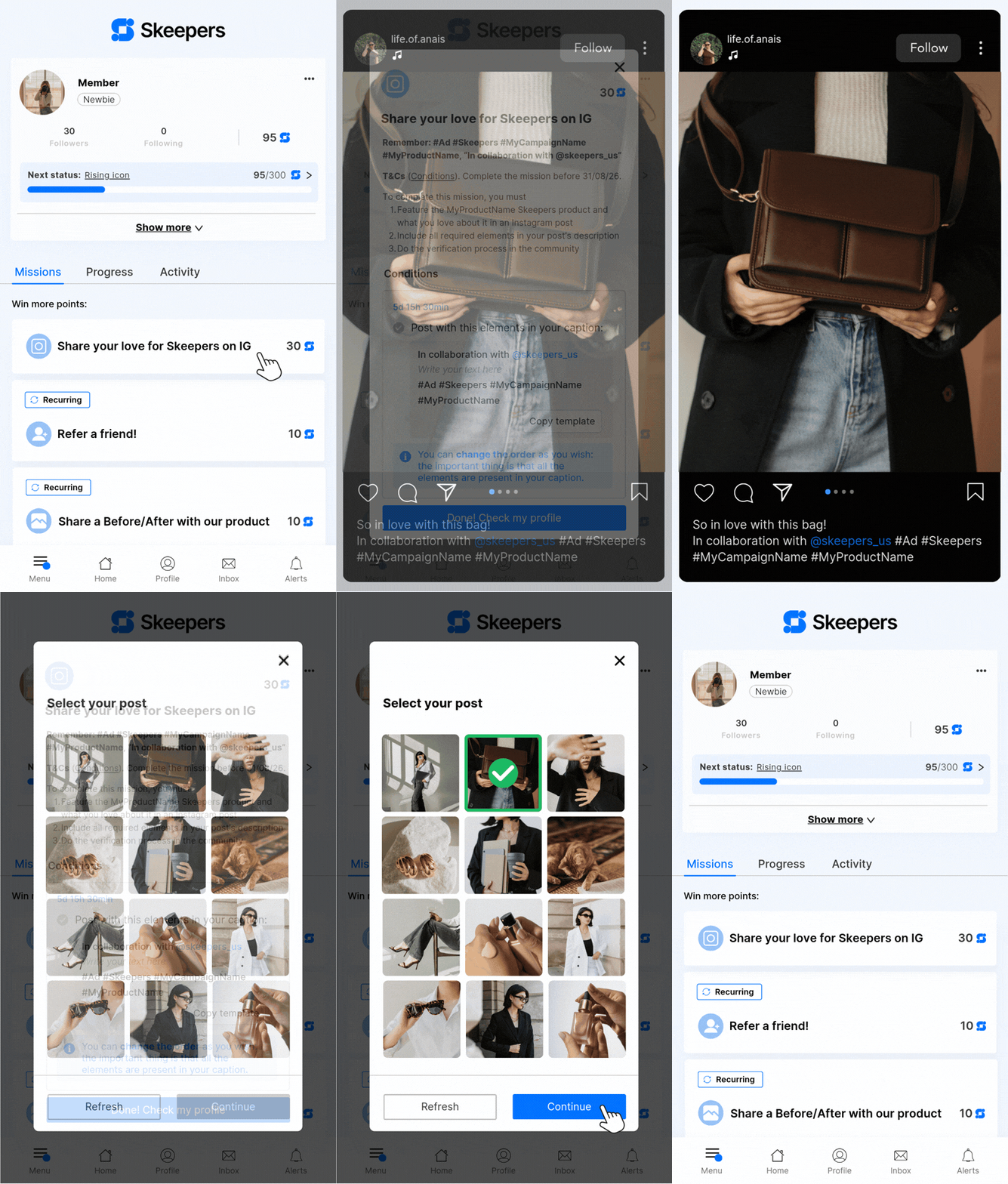
To start the mission approval process, the member must:
- Return to the community after publishing their content
- Open the relevant mission (from their profile), contest, or product testing campaign
- Click the CTA to start the approval process
- Select the post they want to submit to approve this mission
A verification popup opens. The system checks in real time whether the selected post meets all the mission’s requirements.
All requirements are met |
One or more requirements are not met |
|
The post selected by the member is accepted, which approves the mission. Points are awarded within 24 hours to the member’s profile.
|
The popup displays an error message that specifies exactly which requirements are not met. The member can edit their post or select another post, then submit a new participation |
After a post is edited, changes may take 5 minutes to be taken into account.
During this period, the member may still see an outdated result. This is why we recommend waiting at least 5 minutes before trying to approve the mission again.
Approval rules
Approval uses AND logic: all requirements must be met for the participation to be approved.
If one of the mission’s approval requirements is not met (hashtag, compliance wording, or wording placement), the member sees a specific error message indicating what needs to be corrected.
A post can only approve one mission. Once a member selects a post to approve a mission, they can no longer use it to approve another mission.
This helps prevent inconsistent automatic approvals and even fraudulent behavior.
Concrete example: the brand creates 2 different missions that use the same hashtag #Beauty.
If the user creates a post with #Beauty and selects it to approve the first mission, they will no longer be able to select that post to participate in the second mission.
To approve the second mission, they will need to create a post dedicated solely to that mission.
The post selected by the member must contain all required hashtags for the mission to be approved.
Concrete example: the brand creates a mission that requires 2 hashtags, #Beauty and #Skin.
To approve the mission, the post the user selects must contain both #Beauty AND #Skin.
If the selected post does not contain both hashtags, the mission is not approved and an error message indicates which hashtag is missing.
If one or more compliance wordings have been configured for the mission:
- The member must select one (based on their language or their preference) before clicking Copy template
- The wording selected by the member must be present in the post’s caption
- If the option to place the wording at the beginning of the caption is enabled, the wording must appear before the See more fold
Concrete example: the brand creates both English and French wording for the same mission
The member has a mostly French-speaking audience on Instagram, so they select the French wording before clicking Copy template. This allows them to paste the wording and required hashtags directly into their post’s caption.
Key points to keep in mind
To prevent or resolve issues that the member may encounter, here are the important things to know:
- Hashtags must not contain accents or special characters (except _)
- The member must have added or linked the handle of their public Instagram, TikTok, or YouTube account in the community before publishing
- The member must wait approximately 5 minutes after publishing or editing their post before submitting it
- Points may take up to 24 hours to appear on their profile
Need help checking whether a member has completed a social mission? See this checklist.