The social missions flow is changing for members! Discover how this impacts post validation, mission configuration and performance tracking.
What changes for members
Step 1 - Participating in the mission
The overall flow remains the same at first: if the member is registered on the community and their social networks are connected to the platform, they will be able to see and participate in social missions.
They will need to read the brief (hashtags to use, brand guidelines). A button allows them to copy all the required hashtags with a single click so they can easily paste them into the description of their content. They can then publish their content on the relevant social network (Instagram, TikTok or YouTube).
Step 2 - Mission validation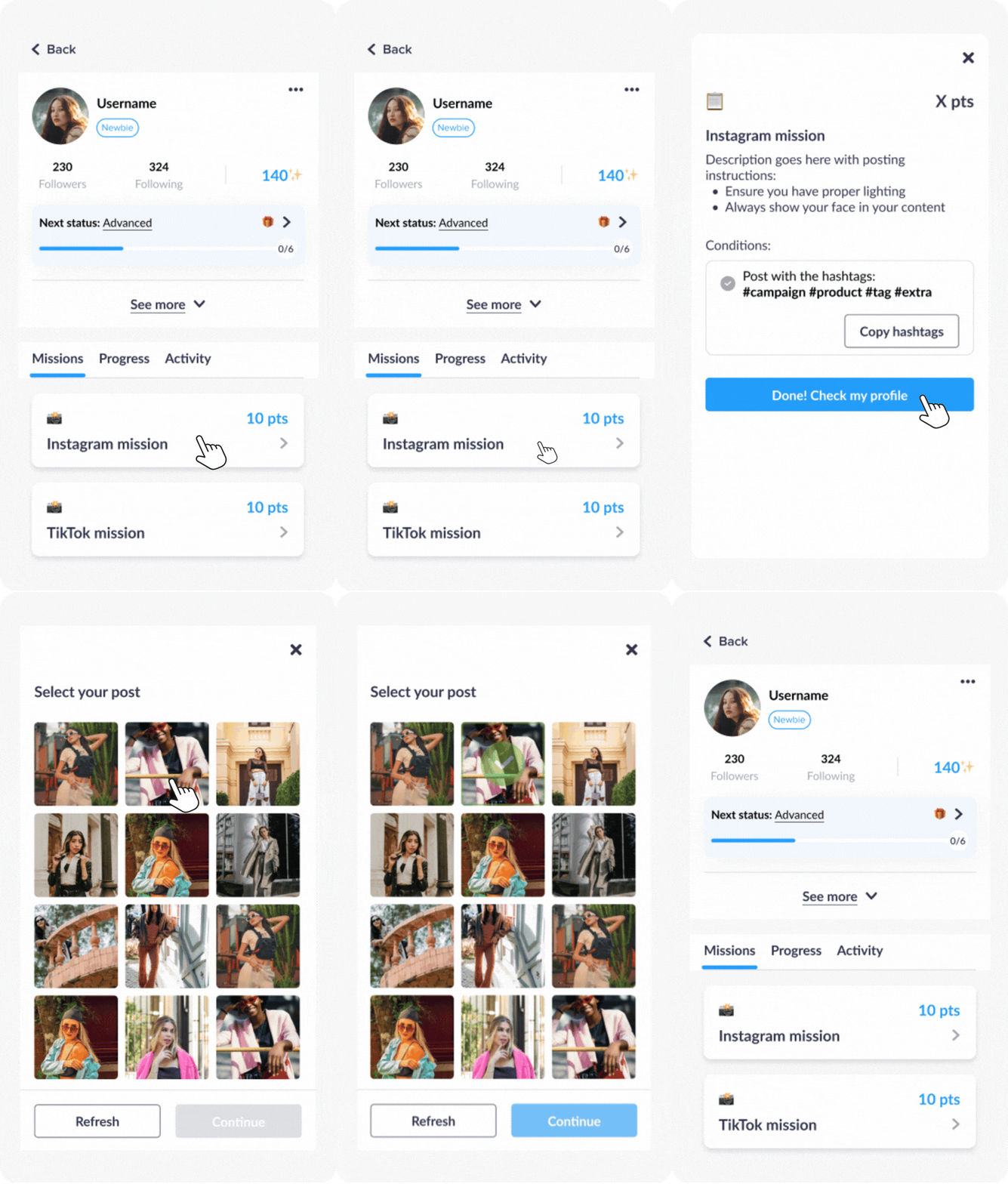
The main difference comes at the validation step. The member must:
- Return to the community after publishing their content
- Open the relevant mission (from their profile), contest or product testing campaign
- Click on the CTA button to start the validation process in the description
- Directly select the post they want to submit to validate this mission
A verification pop-up then opens. The system checks in real time whether the selected post meets all the criteria required for the mission to be validated.
Validation works with AND logic: all criteria must be met by the member for the participation to be validated.
-
The post is accepted
- The mission is validated
- Points are awarded within 24 hours to the member's profile
- The pop-up displays an error message specifying precisely which criteria are not met
- The member can correct their post by editing it, or select a different post, and then submit a new participation
After editing a post, changes can take around 5 minutes to be taken into account.
During this delay, the member may still see an outdated result. This is why we recommend waiting at least 5 minutes before trying to validate the mission again.
New validation rules
A post can only validate one mission. Once a member selects a post to validate a mission, it cannot be selected to validate another mission.
This change helps prevent inconsistent automatic validations and even fraudulent behaviour.
Concrete example: The brand creates two different missions that use the same hashtag: #Beauty.
-
With the old flow
A user could create a single post with #Beauty, and this single post would automatically validate both missions. They would receive 2 rewards for 1 single publication. -
With the new flow
If the user creates a post with #Beauty and selects it to validate the first mission, they will no longer be able to select it to validate the second mission. To validate the second mission, they will need to create a dedicated post for that mission only.
The validation logic switches from OR to AND.
Previously, a single hashtag could sometimes be enough depending on the configuration. Now, all required hashtags must be present in the selected post for the mission to be validated.
Concrete example: The brand creates one mission that require two hashtags: #Beauty and #Skin.
-
With the old flow
A user could create one post with #Beauty and another post with #Skin. These two separate posts would validate the mission, and the user would receive the reward 2 times. -
With the new flow
To validate the mission, the post the user selects must contain #Beauty AND #Skin together. If the selected post doesn't contain both hashtags, the mission will not be validated.
Admin-side changes
Configuration
Setting up the validation condition for a mission, or the participation condition for a contest or product test has been simplified in the back office.
You can select:
- Hashtag / Social post condition for a mission
- Social media type for a contest
- Social campaign asset for a product test
This allows you to select the social media platform concerned and then easily list all the required hashtags in one place.
If you edit the hashtags of an already published and active mission, this can break validation for members who are currently participating.
Performance monitoring
The dashboard dedicated to social campaigns (Statistics > Social Campaigns Hub) is now centred around activities rather than hashtags.
Each entry displays:
- The activity name (mission, product test, contest)
- The type and relevant platform
- The activity creation date
Search is now done by activity name. Associated hashtags remain accessible in the detail view of each activity.
No data will be lost. Performance data tracked by hashtag is aggregated at the activity level in the new Social Campaigns Hub view.
Key points to keep in mind
To prevent or address issues encountered by members, here are the key things to know:
- Hashtags must not contain accents or special characters
- The member's Instagram, TikTok or YouTube account must be public
- The member must have added their social handle to the community before publishing
- The member must wait around 5 minutes after publishing before submitting their post
- Points can take up to 24 hours to appear on their profile
Need help checking whether a member has completed a social mission? Check out this checklist.