These channels includes spaces for sharing content in various formats, such as image galleries, customizable forum-style discussions, or organized by specific categories.
Types of channels
This type of channel is designed to display content in a picture format, similar to a product catalog. It allows users to showcase images in a visually appealing way.
Use case: members can upload images and/or videos around a specific theme (best for photo contests, before/after, visual storytelling).
This channel type provides a classic and highly customizable forum format, similar to what you might find on Facebook. It supports various types of posts and interactions, making it versatile for discussions and content sharing.
Use case: generic discussion feed where members can post content (image, text, or both) and interact with others. It’s the most versatile feed channel.
This channel displays all posts tagged with a specific category. It organizes content by category, making it easier for users to find posts related to a particular topic or theme.
Use case: discussion feed organized by categories, offering members a way to filter content based on interests or specific topics.
Create your feed related channel
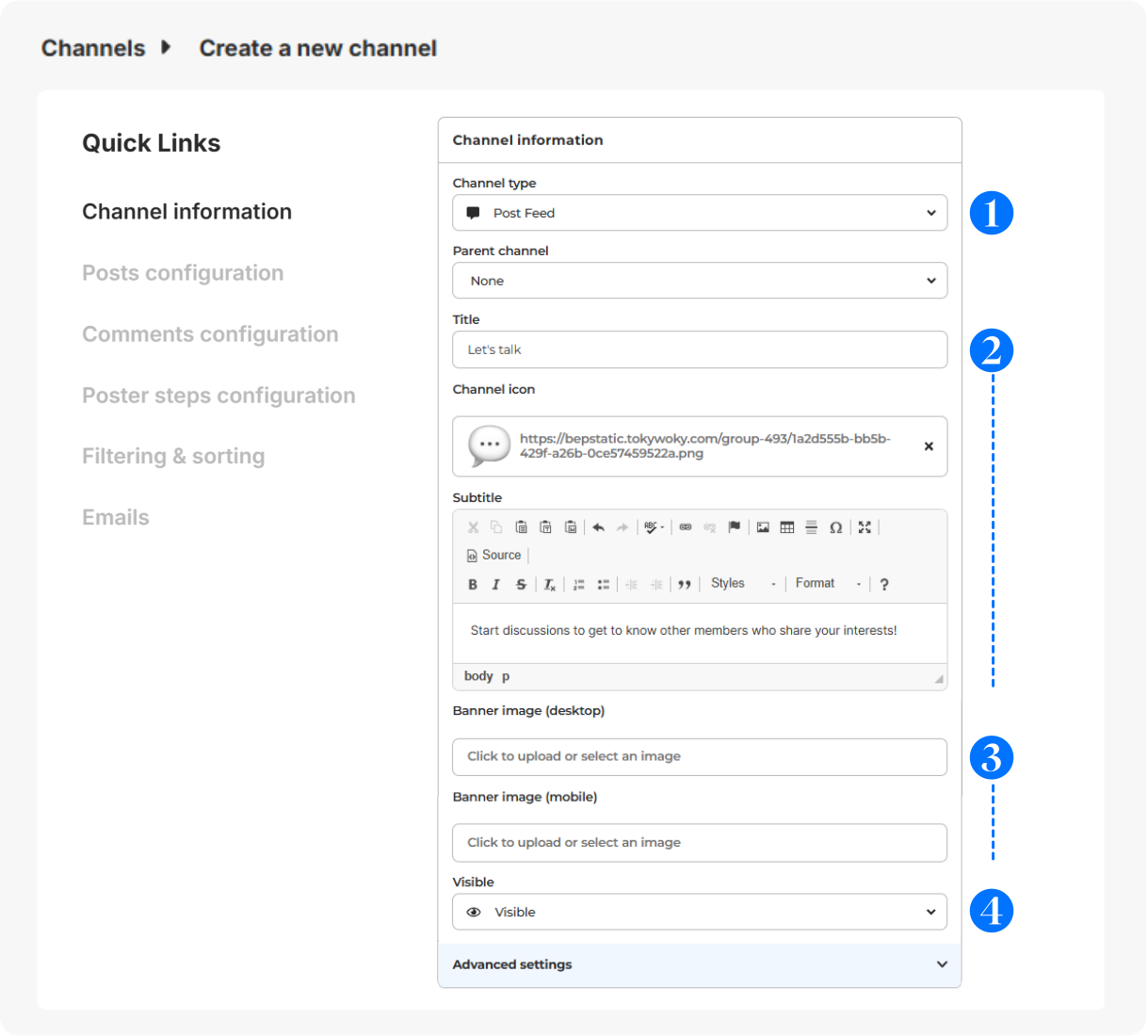
In Configuration > Channels, click on + Add a channel.
- Choose your feed related channel type.
- Give it a title (short and clear for menu display), icon (optional - displayed before the title - 16x16px) & subtitle (to guide your members).
- Select a banner (svg, png or jpg) for desktop (640x200px) or mobile (360x140px).
- Visibility: Visible (to all users), Hidden (to all users, for deactivation), Limited (restricted to certain users for exclusive access), Link (private access with a link).
Advanced configuration
For more details on the configuration of the other sections (Posts configuration, Comments configuration, Poster steps configuration, Filtering & sorting and Emails), please check this article.
Members interactions on the channel
Here's what members can do on each type of channel:
- Gallery: Members can view and browse images or visual content. They might be able to comment on or like the images, depending on the channel's settings.
- Post Feed: Members can create, view, comment on, and interact with posts. This format often supports discussions, likes, and sharing of various types of content such as text, images, and videos.
- Category Feed: Members can view posts that are tagged with specific categories. They can navigate through these posts based on the selected category and may interact with the content through comments or likes, depending on the channel's configuration.
Contests on Post Feed channels
You can create contests linked directly to a Post Feed channel, allowing you to engage your audience with time-limited competitions.
Contests cannot be associated with either a Gallery or a Category Feed channel.
For more information on how to create and manage contests, please check this article.